ZEvents Invite Maker Hobnob
- 4.5
- Rating
- 500.00K
- Installs
- Free
- Price

 Analysis by App-foxy
I like invitation apps that remove the awkward back-and-forth after someone says, “Sure, I’ll come.” Hobnob - Invitation Card Maker takes that simple problem and builds its experience around text-message invitations for birthdays, weddings, graduations, baby showers, and similar gatherings. I found it most useful when I wanted a polished invitation without creating a full event page or asking guests to install another service.
It is a free Events app from Zazzle, rated for Everyone, and it has become a familiar option for people who prefer organizing through their phone’s messaging habits. Its average rating is 4.6 from around 6,200 ratings, with over 500,000 installs. Those figures suggest a healthy user base, but they do not tell the whole story: the real question is whether its invitation-first approach suits the way your guests communicate.
How Hobnob feels in everyday use
The central idea is straightforward. You create an invitation, add the event information, choose how you want it to look, and send it through text messages. That makes the app feel closer to preparing a digital card than configuring a complicated event-management system. I appreciate that distinction because many gatherings do not need a large planning dashboard. They need a clear date, a location, a friendly message, and an easy way for people to respond.
You May Also Like

 Blood Strike: 2.5 Anniversary
Blood Strike’s Loadouts Turn Every Drop Into a Tactical Gamble
A close look at Blood Strike’s custom loadouts: how fast access to signature weapons reshapes its battle royale rhythm, rewards preparation, and narrows the gap between fights.

 Pandora - Music & Podcasts
Pandora’s Music Is Easy to Start, but Harder to Recover
Pandora’s strength is its low-effort path from a seed to a station. Its weak spot is how much confidence it asks you to place in connection, setup, and quiet recovery.

 8 Ball Pool
 Is Built on Rivalries, Rematches, and Routine
A close look at the rivalries, rematches, shared routines, and unanswered safety questions that turn a quick pool match into a persistent mobile community.

 Samsung Music
’s Quiet Strength Is Playing What You Already Own
Its reach comes less from spectacle than from dependable access to a personal library. That simplicity is both the app’s strongest retention engine and its ceiling.

 AccuWeather: Weather Radar
AccuWeather Review: A Quick, Clear Forecast for Everyday Decisions
For everyday plans, the best forecast is the one you can understand quickly. AccuWeather makes rain timing, radar, and local conditions easy to act on, with a few trade-offs.

 Hill Climb Racing
Why Hill Climb Racing Still Turns Crashes Into One More Run
A tiny car, a bumpy hill and one more upgrade: Hill Climb Racing keeps resurfacing because its simple chaos makes every near-miss feel personal.
More From Our News Desk



For a casual birthday, the workflow is especially natural. I can imagine opening the app while planning a small dinner, selecting a design that matches the occasion, entering the time and place, and sending the invitation to the people who matter. Guests are more likely to notice a message arriving in the same place where they already handle everyday conversations than an email buried under work and shopping notifications.
That convenience also shapes the app’s personality. Hobnob is not trying to replace every planning tool. It is aimed at the moment when a host wants something more organized than a group text but less formal than a dedicated event website. In that middle ground, it can save time and make a gathering feel more intentional.
The strongest reason to use Hobnob is the combination of a designed invitation and a familiar text-based delivery method. That combination matters for guests who are not enthusiastic about creating accounts, downloading an app, or learning a new event platform. It also helps the host keep the invitation visually distinct from ordinary conversation.
Where the text-message approach works best
Hobnob makes the most sense when your guest list is made up of people you can contact directly by phone. A family celebration, a children’s party, a graduation gathering, or a small wedding-related event can benefit from that directness. The invitation arrives as part of a channel guests already understand, so the barrier to seeing the details is low.
I would also consider it for a last-minute gathering. If you are arranging a weekend barbecue or a dinner after a ceremony, building a formal event page may take longer than the planning itself. A designed invitation gives the event some structure while keeping the process quick enough for a short timeline.
There is a useful social advantage here too. A plain group message can become confusing when people reply with separate questions, confirmations, and jokes. A dedicated invitation gives everyone one recognizable reference point. In practice, that can reduce the chance that someone misses the address or mistakes an old message for the final plan.
Design choices are more important than they first appear
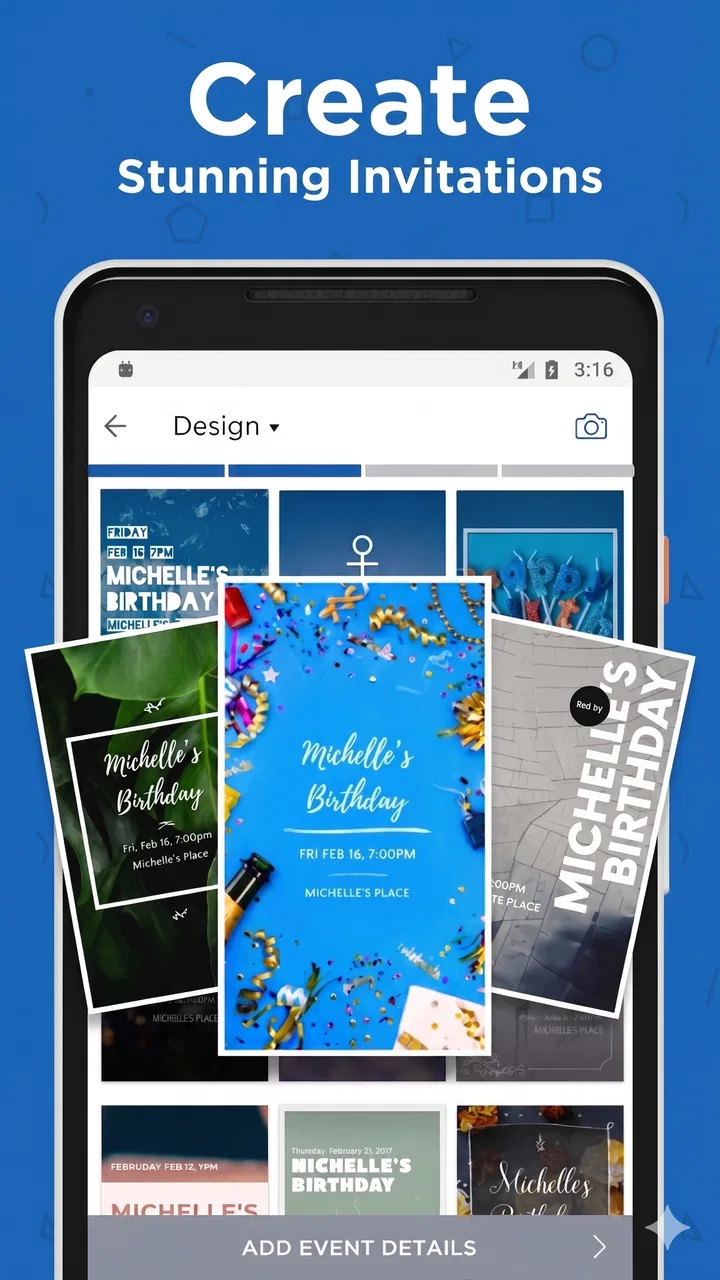
The card-making side is not just decoration. The design becomes a visual label for the event, which is helpful when guests receive several conversations at once. A birthday invitation can feel warmer than a copied paragraph, while a graduation or wedding-related invitation can look more deliberate without requiring professional design skills.
My advice is to choose clarity before novelty. A busy design may look attractive while making the essential information harder to scan. Keep the event name, date, time, and location easy to find, and use the personal wording to supply the warmth. The best invitation is not necessarily the most elaborate one; it is the one a guest can understand in a few seconds.
This is also where Hobnob may appeal to people who do not enjoy designing from scratch. Starting with an invitation format can prevent the blank-page problem that appears in general graphic-design apps. You are not forced to invent a visual system before you can invite anyone. The trade-off is that users wanting complete control over fonts, layouts, or branding may eventually find a specialized design tool more flexible.
A practical workflow for a real gathering
Imagine organizing a baby shower for a relative. I would first settle the details that are most likely to cause confusion: the exact venue wording, the start time, and whether guests need any special instructions. I would then create the invitation before opening the guest list, because reviewing the finished card often reveals missing information that is easy to overlook in a planning conversation.
After that, I would send a small test to someone I trust. This is a simple but valuable habit with any invitation service: check how the message looks outside the creator’s screen, confirm that the location is understandable, and make sure the wording does not imply a detail you have not finalized. Only then would I send it to the wider list.
For a larger event, I would keep a separate note with the guest groups and any special follow-up needed. Hobnob can simplify the invitation itself, but a host may still need to manage family members, coworkers, children, plus-ones, or people who respond through another channel. Treating the app as the invitation center rather than the entire planning brain keeps expectations realistic.
What the current version means for different users
The current version is 4.3.16, and the app has been available since June 22, 2016. That long presence gives Hobnob a more established feel than a newly launched invitation experiment. I see the version information as useful context rather than a promise that every part of the experience will suit every phone or every event style.
For existing users, an updated version can make the day-to-day process feel more dependable, particularly when they return to the app for recurring occasions. Someone who sends invitations for family events each year benefits from having a familiar starting point instead of rebuilding a workflow from nothing. The value is not only in new presentation options; it is also in reducing the mental effort of remembering how to begin.
New users should still take a moment to learn the flow before preparing an important invitation. Familiarity with messaging does not automatically mean familiarity with the app’s card creation process. I recommend creating a harmless practice invitation first, checking each screen, and deciding how you want to handle guest communication before the event becomes urgent.
The minimum operating-system requirement is Android 7.0 or later. That covers many devices, but anyone using an older phone should check compatibility before planning around the app. This is a small step that can prevent an unpleasant surprise when an invitation needs to go out quickly.
What has changed for the better in the broader product journey
Because Hobnob has been around for years and now carries a mature version number, I view its evolution as a move toward a stable invitation utility rather than a novelty card generator. The important effect for me is continuity: the concept remains easy to explain to another person. You create an invitation, send it through a familiar communication route, and use that invitation as the shared point of reference.
That continuity is valuable for households where one person usually handles celebrations. A parent, sibling, or friend can return to the same style of workflow for different occasions without asking guests to adapt to a new platform each time. It also makes the app easier to recommend because the explanation is short and practical.
At the same time, a mature product can carry expectations that are higher than those for a simple card editor. Users may want more control over guest states, reminders, changes to event details, and follow-up communication. If your event depends on complex coordination, you should judge Hobnob as an invitation tool first and look for a more specialized planner when the logistics become the main challenge.
Costs, upgrades, and the free starting point
Hobnob is free to download and use as a starting point, which makes it easy to test before committing to an event workflow. There are in-app purchases ranging from $3.99 to $284.99 per item, so I would not assume that every design or optional element is included at no cost. The sensible approach is to build a draft, inspect what is available without paying, and decide whether any extra purchase genuinely improves the invitation.
This pricing range also means the app may serve different levels of use. Someone arranging one informal gathering can keep the process simple, while a host preparing a more polished event may consider paid choices worthwhile. I would be cautious about upgrading merely because a design looks attractive. First ask whether the purchase improves readability, saves meaningful time, or solves a real requirement for your guests.
For repeated personal use, it is worth deciding on a small style rule before spending anything: use one clear design direction, keep wording concise, and avoid adding visual elements that compete with the event details. A paid option cannot fix an invitation that is confusing. Good organization still matters more than decoration.
Where Hobnob falls short
The text-message focus is both the app’s advantage and its main limitation. If your guests are spread across countries, use different messaging habits, or prefer email, a service built around direct phone messaging may require extra coordination. You may end up sending the same information in several places, which reduces the simplicity that attracted you in the first place.
It is also not the ideal choice for an event with complicated registration. A conference, a large formal reception, or a trip involving meal selections and multiple schedules may need structured forms, ticketing, calendar integration, or detailed attendee management. In those situations, an event platform designed around logistics will probably be more efficient than a card-centered app.
Another limitation is the risk of treating the invitation as a substitute for planning. A beautiful card does not automatically answer questions about parking, accessibility, children, dress expectations, gifts, or changes to the schedule. Hobnob can help present information, but the host still needs to think through what guests will ask after receiving it.
People who want a completely custom visual identity may prefer a general design application. Likewise, users who already maintain events through a calendar, community platform, or email newsletter may find a second invitation channel unnecessary. I would skip Hobnob if your group already has a reliable shared system and adding text-message invitations would create duplicate replies.
Small habits that make invitations more reliable
One useful habit is to write the location as though the guest has never visited it. Include the venue name and a clear address rather than relying on a familiar nickname. Even when the app makes the card look polished, practical wording is what prevents late arrivals and repeated questions.
Another is to separate the invitation message from the follow-up conversation. Keep the main card focused on the event, then use later messages for details such as parking or a change in timing. This keeps the original invitation readable and gives guests a better chance of finding the core information again.
I would also send invitations in waves when the guest list contains different groups. Family members may need different context from coworkers, and a children’s party may require information that is irrelevant to adults attending a formal dinner. Sending thoughtfully rather than all at once helps the wording feel personal and reduces accidental oversharing.
Finally, review the event after sending it from the guest’s point of view. Ask whether the date is unmistakable, whether the location can be found, and whether the invitation makes clear what kind of response is expected. This check is more valuable than endlessly adjusting colors or decorative details.
Who should use it and who should choose something else
I recommend Hobnob to people who want a friendly, attractive invitation that can reach guests through ordinary text messaging. It is particularly suitable for small and medium personal gatherings where the host wants more structure than a group chat but does not need a full event-management suite.
I would be more selective for large events, international guest lists, professional gatherings, or occasions requiring detailed registrations. In those cases, a platform built around forms, calendars, ticketing, or email may provide a clearer system. A general design app may also be better if the visual work itself is your priority.
For most casual celebrations, though, Hobnob strikes a useful balance. It keeps the invitation personal without making the host behave like an event administrator. The free entry point makes experimentation easy, while the optional purchases mean you should review the cost of any extras before finalizing a design.
What I would watch before relying on it for an important event
If I were planning a major celebration, I would pay attention to how smoothly the invitation fits into the rest of my communication. Can every important guest receive the details in a way they will actually notice? Will replies remain understandable when people answer at different times? Do I have a backup way to reach someone who does not respond through the invitation?
I would also watch for the boundary between presentation and coordination. Hobnob is strongest when the event details are settled and the invitation is the next step. It becomes less suitable when the event is still changing every day or when guests need to make several structured choices.
My overall view is positive, with that boundary clearly in mind. Hobnob - Invitation Card Maker is a practical choice for turning a personal event announcement into something clearer and more memorable than a standard text. Its best quality is not simply that it makes attractive cards; it connects those cards to a communication habit people already understand.
I would use it for a birthday, shower, graduation gathering, or informal celebration where warmth and simplicity matter more than advanced event administration. I would not force it onto a complex event just because the invitation looks good. Used for the right job, it gives the host a quick, approachable way to invite people and gives guests a clear place to start.
For readers who want to try that approach, the app is free to begin with, supports devices running Android 7.0 or later, and is intended for Everyone. My recommendation is to draft the invitation early, test the wording with one person, keep the essential details prominent, and treat any paid design choice as optional rather than necessary. That small amount of preparation lets the app’s real strength—simple, personal invitations by text—stand out.
FAQs for ZEvents Invite Maker Hobnob
01What features does Hobnob - Invitation Card Maker offer?
Hobnob provides a variety of features, including customizable invitation templates, RSVP tracking, and event reminders. Users can easily design invitations with personalized text, images, and themes. The app also supports sharing via text, email, or social media, making it convenient to reach all your guests.
02Is Hobnob free to use, or are there in-app purchases?
Hobnob offers a free version with basic features. However, to access premium templates and additional functionalities like advanced RSVP tracking, users may need to make in-app purchases or subscribe to a premium plan. This allows users to enhance their event management experience.
03How user-friendly is the Hobnob app for beginners?
Hobnob is designed with a user-friendly interface, making it accessible for beginners. The step-by-step process for creating invitations is intuitive, and the app offers guidance along the way. Even those unfamiliar with design tools will find it simple to create professional-looking invitations.
04Can I track RSVPs and manage guest lists using Hobnob?
Yes, Hobnob offers robust RSVP tracking and guest list management features. Users can monitor who has accepted or declined their invitations and send follow-up reminders. The app also provides analytics, helping hosts manage their events efficiently and ensure no guest is overlooked.
05What types of events can I use Hobnob for?
Hobnob is versatile and can be used for a wide range of events, from birthdays and weddings to business meetings and casual gatherings. Its customizable templates cater to various themes and occasions, making it a flexible tool for both personal and professional event planning.
Pros
- Easy-to-use interface for quick creations.
- Wide variety of templates available.
- Option to track RSVPs in real-time.
- Seamless integration with calendars.
- Customizable design features.
Cons
- Limited free template options.
- Occasional app crashes reported.
- Some features require in-app purchases.
- Limited social media sharing options.
- Notifications can be inconsistent.

ZEvents Invite Maker Hobnob
Gallery